


Linutop Kiosk player is a powerful digital signage software, designed to set up a digital signage player for one screen or a secure internet access kiosk. Available for PC & Raspberry Pi, included in Linutop OS.
Display photos, PDF, videos, music or web pages with Linutop Kiosk. Configure and display a self-made playlist of your digital content - easy to use.
Linutop's light weight and size, plus the easy setup of Linutop Kiosk, make it ideal for light web signage and narrowcasting. Linutop TV can remotely control your screens' network.
Ideal for: Shops, Advertising, Point-of-sale displays, Vending machines, Museums, Public transport, City halls, etc.

Linutop Kiosk software can be quickly set up as the starting application, with predefined settings.
Parameters : Starting page, whitelist or blacklist, display options, locked with a password, etc.
Secure : with the "lock mode", the initial state is always recovered at each restart.
Ideal for: Waiting rooms, Hotel lobbies, Offices, Hospitals, Schools, Libraries.
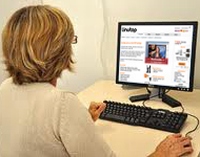
Linutop Kiosk Setup helps you easily set up your Web kiosk and/or digital signage player through the interface. Linutop Kiosk can be set up in 3 modes:
As a professional web terminal, customize the navigation parameters: default URL, archive management, maximum number of simultaneously open windows, and the display time of the time-out message, local or remote website.
This menu manages the display playlist, including time and order, and supports photos, URLs, videos, PDF and music files, plus screen sleep mode. The playlist can be managed from a local playlist (including a local folder), a remote Linutop.tv server (local or on the Internet), or a USB key.
Use your system as a public web kiosk which turns itself into a digital signage screen when nobody is using it.
Important: Linutop Kiosk can start automatically at startup. It will also be completely locked in Web Kiosk or Digital Signage Player use.
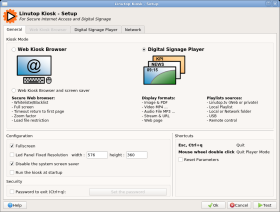
Linutop Kiosk Setup - Mode selection
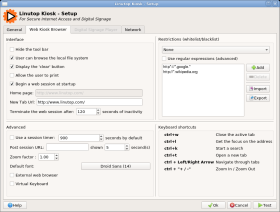
Linutop Kiosk Setup - Internet kiosk setup
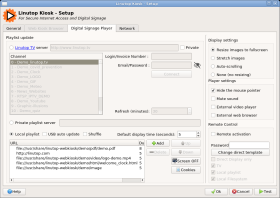
Linutop Kiosk Setup - Digital signage setup
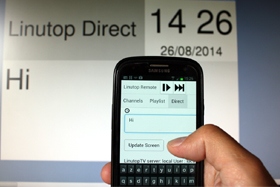
Linutop Kiosk remote lets you control your screen from a web browser.
Channel : local playlist or Linutop TV selection
Playlist : playlist item selection
Direct : display a text directly
Linutop remote is accessible from any browser on a smartphone, tablet or PC, for a more reactive display:
With no moving parts, Linutop offers a completely silent, energy-efficient operation in an extremely small package - up to 10 times less power than a regular PC.
The Linutop operating system is stored in internal flash memory and cannot be altered by viruses or mishaps. The system can be locked with a password, and its initial state recovered at each restart.
The USB key back-up feature makes it easier to deploy a single configuration. Linutop ships with ready-to-use open source software: Firefox, Open Office, VLC Media Player...